
In Cobblemon, Pokémon only evolve after you meet the listed requirements and then manually press Evolve in the Pokémon status screen. Common triggers include level, friendship, evolution stones, Link Cable trades, time of day, biome location, specific moves, and travel distance. If the Evolve button never shows up, one of those conditions isn't met yet, so work through them one at a time before assuming something's broken.
TL;DR:
- Evolution in Cobblemon is entirely manual and depends on meeting specific conditions for each Pokémon, such as level, friendship, or items.
- Common triggering methods include level, friendship, stones, trades with Link Cables, moves, time of day, biome location, or accumulated travel distance.
- Misunderstanding requirements or missing a single condition is the main cause of evolution failures, not bugs or glitches.
- Using community tools like the Cobblemon Islands wiki and server trading hubs can significantly speed up obtaining stones and fulfilling conditions.
- Batch raising friendship and gathering stones in bulk, combined with crafting a reusable Link Cable, maximizes evolution efficiency.
Table of Contents
- How Cobblemon Evolutions Actually Work In-Game
- Cobblemon Evolution Methods At A Glance
- Where To Find And Use Evolution Stones
- Link Cable Recipe And How Trade Evolutions Work
- Raising Friendship And Timing Evolutions Right
- Move-Based And Location-Locked Evolutions, Step By Step
- The Troubleshooting Checklist When Evolution Won't Trigger
- Eeveelutions And Other Tricky Evolution Lines
- Cobblemon Islands Resources For Evolution Hunting
- Recommended Playstyle For Evolving Efficiently
- Get Evolving Faster On Cobblemon Islands
- Sources
How Cobblemon Evolutions Actually Work In-Game
Nothing evolves on its own in Cobblemon. That's a deliberate design choice, and once you know the flow, triggering an evolution takes about ten seconds.
Here's the exact sequence:
- Press M (the default keybind) to open your Pokémon status screen.
- Select the Pokémon you want to check from your party list.
- Look under its portrait for an Evolve button.
- If every requirement is met, the button appears and evolves it, updating its stats and moveset immediately.
That manual trigger exists for a real gameplay reason. In the mainline Pokémon games, evolving too early can lock you out of a move you wanted to keep, or change a design you liked. Cobblemon never evolves automatically, which means you keep full control over when a Charmander becomes a Charmeleon or when your favorite Eevee finally levels up. You can sit on a fully-evolvable Pokémon indefinitely while you teach it a move from an earlier level range, then evolve it the moment you're ready.
The tricky part is when some conditions are met but not all of them. Say a Pokémon needs both high friendship and nighttime to evolve. If you check the status screen at noon with friendship at 140 out of the roughly 160 many guides point to, you won't see an Evolve button, and the game won't tell you which piece is missing. That silence trips up more players than any actual glitch does. The fix is always the same: pull up the exact requirements for that species and check them off one by one rather than guessing.
Cobblemon Evolution Methods At A Glance
Cobblemon's evolution system pulls directly from the source games, and community-tracked Pokedex data shows just how lopsided the methods are. Level-based evolutions dominate, with hundreds of species using them, while evolution stones account for a much smaller slice, somewhere around 50 species depending on how you count regional variants. Here's what you're actually working with.
-
Level-based evolution. The most common trigger by far. Some Pokémon evolve at a fixed level (Charmander at 16), others need a level plus a held item or location. Exp. Candy items speed this up without a single battle, useful if you're trying to push a low-level catch straight to its next form.
-
Friendship-based evolution. Species like Golbat and Chansey evolve once their friendship score crosses a threshold that guides commonly cite as 160 or higher. You can peek at relative friendship in the summary screen's heart icon, though the mod doesn't show you a raw number, so you're reading a rough indicator rather than an exact count.
-
Stone-based evolution. Feed a Fire Stone to Vulpix, a Water Stone to Poliwhirl, and so on. The stone is consumed on use, so keep a small stockpile if you're evolving several of the same species.
-
Trade/Link Cable evolution. Species like Kadabra and Machoke normally require trading with another player. Cobblemon replaces that with a craftable Link Cable, covered in detail below.
-
Move-based evolution. A handful of Pokémon need to know a specific move before they'll evolve, usually alongside another condition like level or friendship. Bonsly, for example, needs Mimic learned before it can move forward.
-
Time-of-day evolution. Eevee's split into Espeon and Umbreon depends on the in-game clock, but almost never on time alone. It's layered on top of a friendship requirement, which is a distinction that trips people up constantly.
-
Location or biome-based evolution. Certain regional forms and species only unlock their evolution when you're physically standing in the right biome, snow, desert, or otherwise.
-
Travel/distance-based evolution. A small set of Pokémon evolve after walking a set distance with them in your active party, sometimes cited around 1,000 blocks for species that use this method in the source games.
-
Held-item evolution. Some Pokémon need to hold a specific item (Metal Coat, King's Rock, Deep Sea Tooth) either permanently or specifically during a Link Cable trade.
For any species that mixes two or more of these, run a quick mental checklist before you open the status screen: level or friendship met, correct item equipped or held, correct time or biome active, correct move learned, and correct distance traveled. Miss one, and the Evolve button simply won't render, with no error message to point you toward the gap.
Where To Find And Use Evolution Stones
Evolution stones aren't crafted from scratch in Cobblemon. They're mined as ore, then optionally turned into storage blocks once you've collected enough.
Each stone type spawns tied to a biome, which mirrors how the source games handle regional distribution. Fire Stone ore tends to show up in deserts and volcanic terrain, Ice Stone ore favors frozen biomes and snowy peaks, and other stone types follow similarly themed logic; swampy or overgrown areas skew toward Leaf and Moon Stone deposits. If you already know your Minecraft biomes, you basically already know where to dig.
Statistic to keep in mind: guides tracking Cobblemon's evolution catalog put stone-based evolutions at roughly 50 species out of the mod's hundreds of total evolution lines, which makes stones a smaller but still essential category, especially since several classic Pokémon (Vulpix, Growlithe, Eevee's stone-based branches) rely on them exclusively.
Using a stone once you have it takes four steps:
- Equip the correct evolution stone in your hotbar.
- Release the target Pokémon from its Poke Ball into the world.
- Right-click the Pokémon's sprite while holding the stone.
- Confirm the Evolve prompt; the stone is consumed on use.
A few practical notes worth banking before you start mining. A pickaxe enchanted with Fortune increases your ore yield per vein, which matters a lot if you're farming stones for multiple Pokémon rather than just one. On Cobblemon Islands, players regularly compare notes on which realms have the richest stone-bearing biomes in server chat and the trading hub, so if you're stuck grinding solo, that's worth checking before you burn hours in the wrong terrain.
Pro Tip: Craft your stones into storage blocks the moment you collect more than a handful. It's a small inventory management habit that saves real hotbar space when you're juggling several evolution projects at once.
Link Cable Recipe And How Trade Evolutions Work
Cobblemon replaces multiplayer trading with a single craftable item: the Link Cable. It's the reason species like Kadabra, Machoke, and Graveler don't require a second human player to progress past their traditional trade-locked forms.
The recipe is fixed and simple:
- 2 Nether Quartz
- 2 Copper Ingots
- 1 Ender Pearl
Combine those in a crafting table and you've got a reusable Link Cable ready to go. Usage mirrors the stone process almost exactly. Equip the Link Cable, release the target Pokémon, right-click its sprite, and the Evolve option appears in the status screen.
Where it gets more involved is the subset of trade evolutions that also require a held item. Scyther becoming Scizor is the classic example. In the source games, Scyther only evolves when traded while holding a Metal Coat, and Cobblemon preserves that dual requirement. The Link Cable substitutes for the trade half, but you still need the Metal Coat equipped on the Pokémon before you use the cable. The same pattern applies to Up-Grade for Porygon and Prism Scale for Feebas' evolution into Milotic.
Before you use the cable, confirm two things: the item is actually held (not just sitting in your inventory) and the species genuinely needs it. A handful of trade evolutions, like Kadabra to Alakazam, need nothing but the cable itself, so double-checking the exact requirement first saves you an unnecessary item hunt.
Raising Friendship And Timing Evolutions Right
Friendship evolutions are less about grinding a specific action and more about consistent, low-effort habits stacked over time. If you're trying to push a Pokémon toward its friendship threshold quickly, a few tools do most of the heavy lifting.
Catching or transferring the target Pokémon into a Luxury Ball roughly doubles its friendship gain rate compared to a standard Poke Ball, according to community wiki guidance on Cobblemon's friendship mechanics. Holding a Soothe Bell adds a further passive boost. Beyond gear, simply keeping the Pokémon in your active party and using it in battles raises friendship steadily, and certain berries can nudge it further depending on the Pokémon's nature.
Guides commonly cite a friendship threshold around 160 or above for evolutions like Golbat into Crobat, though the mod doesn't display a raw number, so you're working from the heart-icon indicator in the summary screen rather than a hard count.
Time-of-day evolutions are where a lot of players get stuck without realizing why. Espeon and Umbreon are the textbook case: both need high friendship, and the split depends on whether it's day or night when you open the status screen. Time alone never triggers the evolution. It's layered on top of the friendship requirement, and if friendship isn't there yet, no amount of waiting for sunrise or sunset will do anything.
Travel-based evolutions follow a similar logic but track distance instead of friendship or clock time. Some species need roughly 1,000 blocks walked with them active in your party, which means keeping them out of the party mid-grind resets your progress. A simple way to confirm you're actually racking up distance is to walk a fixed loop, check the status screen, walk it again, and watch for the Evolve prompt to appear once you've covered enough ground.
- Use a Luxury Ball and Soothe Bell together for the fastest friendship gains.
- Battle with the Pokémon regularly instead of leaving it boxed.
- Check day/night status before assuming a time-locked evolution is broken.
- Keep travel-based Pokémon in your active party at all times while covering distance.
Pro Tip: If you're stacking friendship and travel requirements on the same Pokémon, do your walking during the day and your battling at night. You'll hit both conditions without wasting a single in-game cycle.
Move-Based And Location-Locked Evolutions, Step By Step
Move-based evolutions require a specific attack in the Pokémon's moveset before Evolve will appear, and they're easy to miss because the game won't flag which move is missing. Bonsly is a good example: it needs Mimic learned, on top of hitting the friendship threshold most rock-type baby Pokémon require. The fix is straightforward once you know it. Check the species' level-up move list, teach or wait for the correct move, then reopen the status screen.
Here's a workflow you can reuse for any move-locked species:
- Look up the exact move requirement for that Pokémon (not a similar-sounding move).
- Level the Pokémon up naturally until it learns the move, or use a compatible TM/move-relearner if the mod supports it for that species.
- Confirm the move is actually in the current moveset (not overwritten by a newer one).
- Reopen the status screen and check for Evolve.
Location and biome-based evolutions work differently. Instead of an item or action, the trigger is simply where you're standing. Certain regional forms and biome-locked evolutions only activate while your character and Pokémon are physically inside the correct terrain, snowy peaks, deserts, or otherwise.
A quirk worth knowing: some Cobblemon builds detect biome based on your current position at the moment you check, not your recent history. If you teleport or travel through the Nether or End to reach a target biome, walk a short distance once you arrive before checking Evolve, since instant transitions can occasionally cause biome detection to lag behind your actual location.
- Confirm the exact move name before assuming a move-based evolution is glitched.
- Walk a few blocks after teleporting into a target biome before checking Evolve.
- Combine held-item checks with Link Cable use for trade-plus-item species.
- Re-check the status screen after every single condition change, not just once at the end.
The Troubleshooting Checklist When Evolution Won't Trigger
Most "broken" evolutions turn out to be one missed requirement, not an actual bug. Run through this order before you assume anything's wrong:
- Is the Pokémon released and interactable, not still boxed or in a Poke Ball, for stone or Link Cable use?
- Is the correct item equipped in your hotbar (for stones) or genuinely held by the Pokémon (for trade-plus-item cases)?
- Is friendship actually high enough? Check the heart indicator in the summary screen rather than estimating from memory.
- Is it the right time of day or the right biome, and have you walked a few steps if you just arrived or teleported in?
- Has the required move actually been learned, and is it still present in the current moveset?
- Has the travel distance requirement been met while the Pokémon stayed active in your party the whole time?
| Symptom | Likely cause | Quick fix |
|---|---|---|
| Evolve button never appears | One hidden requirement unmet | Recheck friendship, item, time, and move together |
| Stone doesn't work on right-click | Stone not equipped in hotbar | Move the stone to an active hotbar slot |
| Link Cable evolution fails | Item not held, only carried | Equip the item directly on the Pokémon first |
| Time-locked evolution stalls | Friendship threshold not yet met | Raise friendship before waiting on day/night |
| Travel evolution stuck | Pokémon left party mid-walk | Keep it active for the entire distance |
If you've run every line on that checklist and the Evolve button still won't show, the next step is checking a species-specific wiki page for a quirk unique to that Pokémon's line, since a few evolution chains carry conditions that don't fit the standard categories above. Genuine bugs do happen occasionally in modded environments, but they're rare compared to a simple missed requirement.
Eeveelutions And Other Tricky Evolution Lines
Eevee is the single best example of why checking every requirement matters, since its evolution family branches across nearly every method Cobblemon supports.
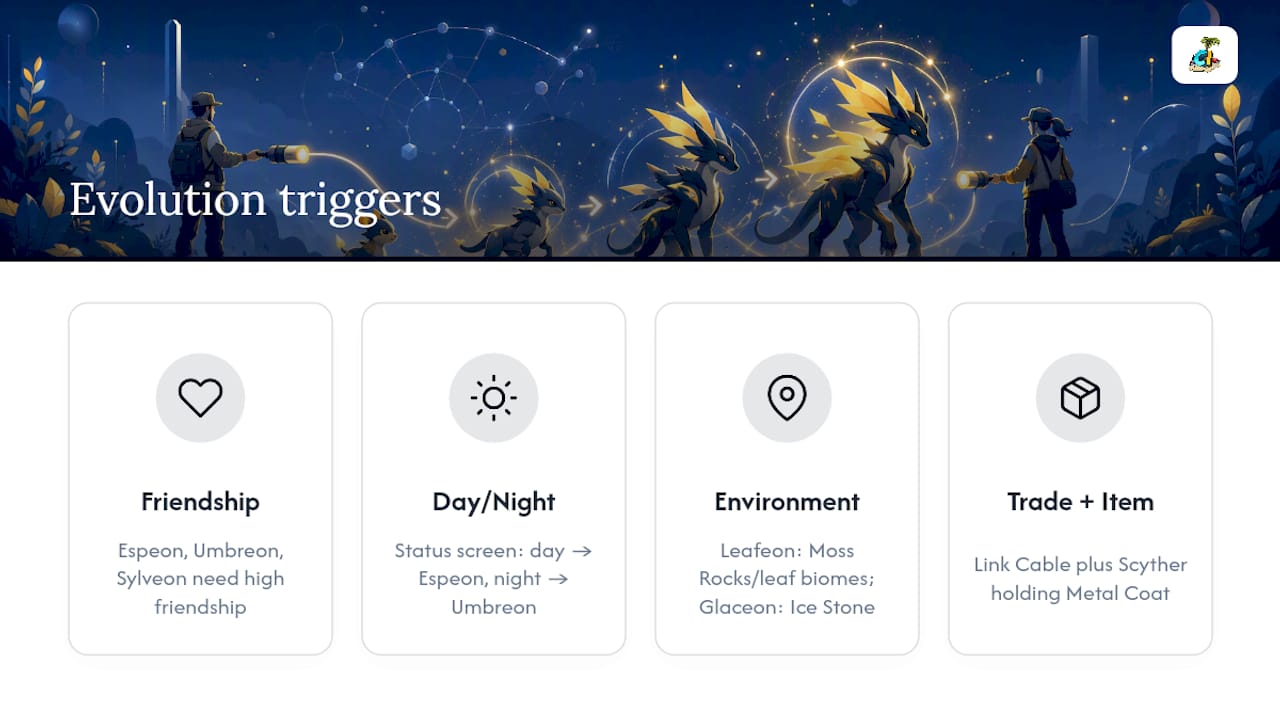
Espeon and Umbreon both need high friendship first. Once that threshold is crossed, the split depends on the clock: checking the status screen during the day produces Espeon, checking at night produces Umbreon. Nothing else about the process changes, it's purely friendship plus a clock check.
Leafeon and Glaceon skip friendship entirely and use environment instead. Leafeon evolves near Moss Rocks or in leaf-heavy biomes depending on the build, while Glaceon typically uses an Ice Stone rather than a location trigger in most Cobblemon configurations, which means checking the current requirement for your installed version matters more here than with the other Eeveelutions.
Sylveon leans on friendship again, similar to Espeon and Umbreon, but without the day/night split. The same Luxury Ball and Soothe Bell tactics from earlier in this guide apply directly, so if you're already grinding friendship for one Eevee branch, you're effectively grinding for Sylveon too.
Outside the Eevee line, Scyther evolving into Scizor remains the go-to example of a trade-plus-item evolution. You need the Link Cable crafted and equipped, plus a Metal Coat actually held by Scyther, not just sitting in your inventory. Metal Coat generally turns up through the same loot and trading channels as other held-item evolution items, so checking your server's player-run trading hubs before assuming you need to hunt for it yourself can save real time.
Cobblemon Islands Resources For Evolution Hunting
Finding the right stone or item gets a lot faster when you're not doing it entirely alone, and that's where a live server community earns its keep. The Cobblemon Islands wiki breaks down spawn locations, biome details, and mechanics across all five realms, which helps when you're chasing a stone or biome-locked evolution that isn't in your immediate area.
The server's player-run economy also matters more here than you might expect. Chest shops and global trade let you buy a Metal Coat or a specific evolution stone from another player instead of grinding for hours, and the new-player spawn guide points you toward the nearest hubs where that kind of trading actually happens. Server events, mass outbreaks, and raids also tend to flood specific items into circulation temporarily, so keeping an eye on event announcements can shortcut an otherwise long search.
If you get stuck on a requirement that doesn't match anything in this guide, the community Discord and wiki talk pages are where players compare notes on server-specific quirks that don't show up in general Cobblemon documentation. Reviewing the server rules page first will also save you a warning if you're new to trading etiquette on a live economy.
Recommended Playstyle For Evolving Efficiently
The single biggest efficiency gain in Cobblemon isn't a hidden trick. It's batching. Instead of chasing one evolution at a time, raise friendship on three or four Pokémon simultaneously with a shared Luxury Ball and Soothe Bell rotation, and mine stones in bulk runs through their matching biomes rather than one-off trips.
Delaying an evolution on purpose is underrated. If a Pokémon learns a move you want to keep at its current level, hold off on evolving it until after that move is locked in, since some movesets shift once evolution happens. And frankly, the Link Cable is the most underused tool in the whole system. A lot of players still hunt for another human to trade with out of habit, when crafting the cable once solves nearly every trade evolution permanently.
If you find a server-specific quirk that doesn't match a general Cobblemon guide, note it down and share it. Community wikis stay accurate because players report what actually happened in their game, not just what the source material says should happen.
— Diablo D. Turtle
Get Evolving Faster On Cobblemon Islands
Some servers cut out the part of evolution hunting that eats the most time: figuring out where an item or stone actually spawns. Downloadable modpacks can preload the connection address so you press play and land straight into realms with active chest shops, global trade, and a wiki built around their biomes and item spawns, instead of guessing which general Cobblemon guide applies to your build.
Beyond items, the community itself does a lot of the legwork for you. Player-run gyms, raids, and mass outbreaks regularly push specific held items and stones into circulation, and the global trade system means you can buy a Metal Coat or Ice Stone from other players rather than mining for hours. If you're chasing a tricky evolution line like Scyther into Scizor, or farming friendship efficiently, having an active economy behind you can change the math completely.
Ready to see it for yourself? Check the server rules and join details to grab the modpack and get your Minecraft Java Edition client pointed at the right address.